Check a Carbon Passport
Scan the QR code on any Carbon Passport, or enter its ID and check code. Any buyer can use this page, including buyers the passport was passed on to.
This page shows the live Carbon-OS record. If anything on a document differs from this page, rely on this page. Report a suspected fake to hello@imssystems.tech.
A Carbon Passport is a carbon footprint you can check, not just read.
Suppliers get asked for the same carbon figures by every buyer, every tender and every framework. A Carbon Passport answers once: a two-page, signed record of an organisation's Scope 1, 2 and 3 emissions, calculated by Carbon-OS from its own spend data and business activity data (energy, fuel, fleet, freight, travel and waste) using UK DEFRA conversion factors.
A PDF can be edited, forwarded and outlived by events. So every passport also has a live record on the Carbon-OS register. This page reads that record. If a passport has expired, been replaced or been withdrawn, you'll see it here, even if the copy in your inbox says otherwise.
Every part of the passport has a job.
Hover or tap a number to see what each part tells you, and which part this page checks against the register.
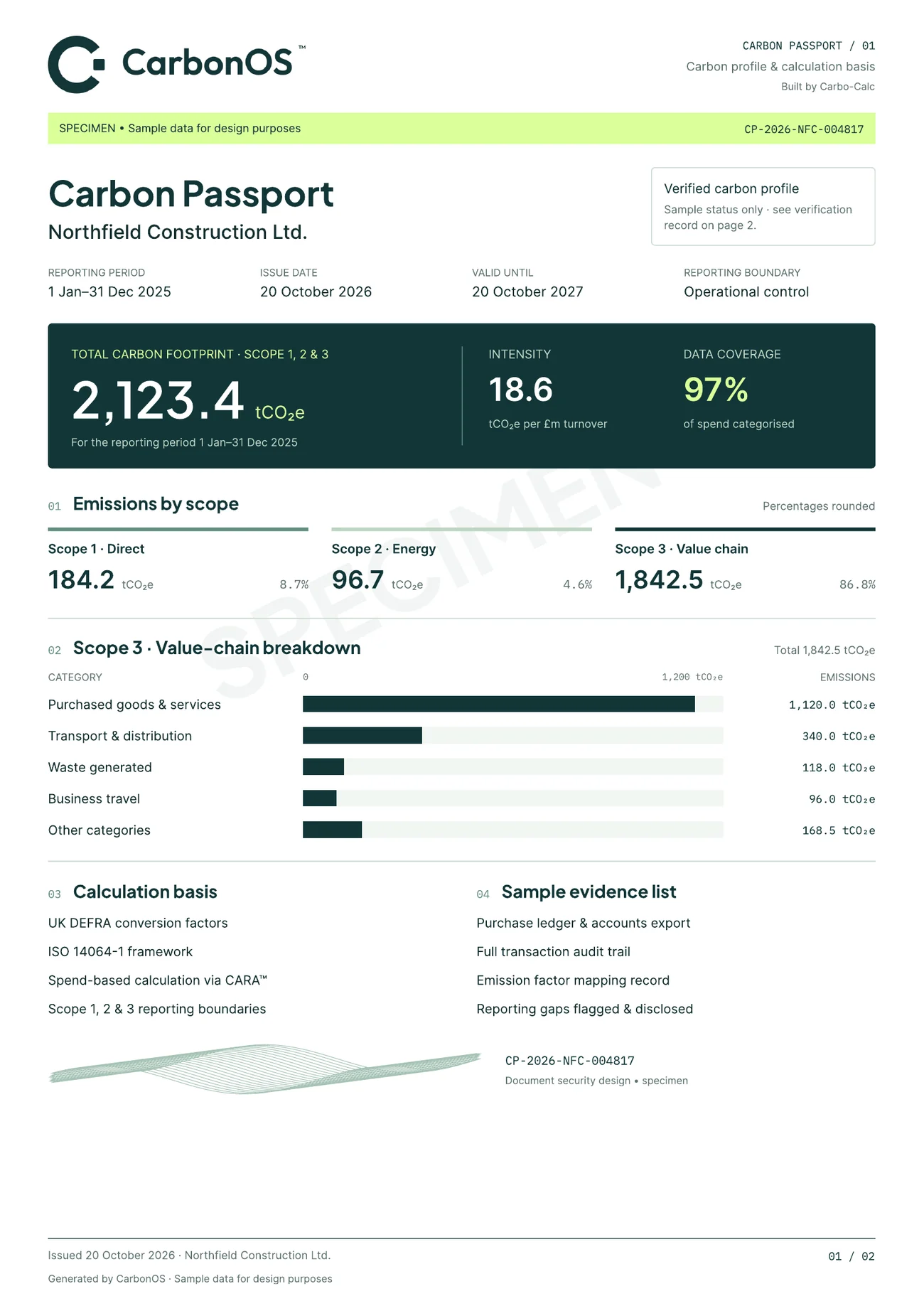
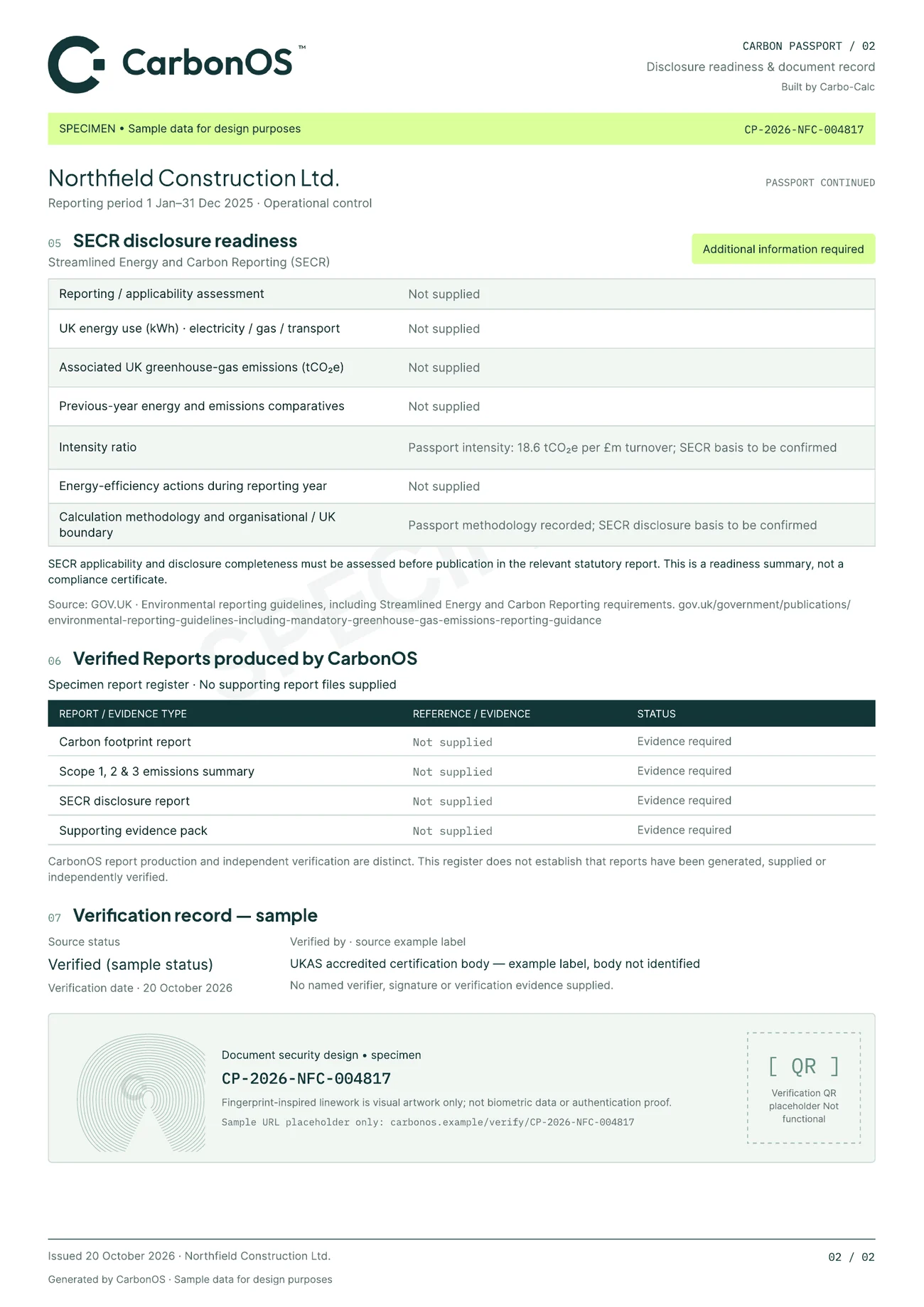
- 1Passport ID
Format CP-YEAR-ORG-NUMBER. Unique to one passport and one version. Enter it above to pull up the live record.
- 2Status
The passport's status. This specimen shows a sample label for illustration. On an issued passport, Verified means a UKAS-accredited body has verified it, and that body is named on page 2 and on this page.
- 3Period, dates and boundary
The year the figures cover, when it was issued, when it stops being valid, and which parts of the organisation are counted.
- 4Headline figures
Total tCO₂e, intensity per £m turnover, and data coverage. Low coverage means a less complete picture.
- 5Emissions by scope
Scope 1 (direct), Scope 2 (purchased energy) and Scope 3 (the value chain), each in tCO₂e. These are the figures the register holds.
- 6Value-chain breakdown
Where Scope 3 comes from, category by category. Usually the biggest share and the one buyers ask about most.
- 7Calculation basis and evidence
The method used and the records behind it, so you know what you could ask to see.
- 8Security linework
Fine artwork that makes a printed copy hard to recreate cleanly. It's visual design only, not proof on its own. The register is the proof.
- 9SECR readiness
Which Streamlined Energy and Carbon Reporting items are supplied and which are still missing. A readiness summary, not a certificate.
- 10Report register
The reports and evidence linked to the passport, each with its status, so you can see what's been supplied.
- 11Verification record
Who verified the passport and when. A real Verified passport names the accredited body, the date and the signed statement.
- 12QR code and security panel
On an issued passport, the QR code opens this page with the ID filled in. The panel also carries the passport ID and its security artwork. On this specimen the QR is a placeholder.
Official Carbon Passport design · specimen. Northfield Construction Ltd. is sample data for design purposes.
Four checks, in about a second.
The passport in your hand is only a pointer. The check compares it with the record Carbon-OS signed when it was issued, and tells you what that record says today.
Scan the QR code and this page opens with the ID and check code filled in. No QR? Type both in.
The 8-character check code belongs to one passport only, so nobody can look up records by guessing IDs.
The record is digitally signed by a Carbon-OS key. A valid signature means the figures haven't been changed since issue.
In date? Replaced by a newer version? Withdrawn? You see today's status, whatever the document says.
- ✓Signature valid
- ✓Code matches
- ✓Within valid-until date
- ✓Not revoked or replaced
What each result means, and what to do next.
The passport is real, unchanged, in date and the latest version. You can rely on the figures shown on this page.
The passport was real, but it's past its valid-until date. The figures describe an earlier year.
The supplier has issued a newer passport, for example after correcting data or completing verification.
Carbon-OS has withdrawn the passport. Don't rely on any figures from it.
There's no passport with that ID, or the check code belongs to a different one. Usually a typing slip; occasionally a fake.
Typing tip: check codes don't use the letters O, I or L, so you can't mix them up with 0 and 1. Upper or lower case both work, and the dash is optional.
Two honest labels. We never blur them.
Every passport is Evidenced: its methodology, audit trail and evidence list are attached, and any reporting gaps are flagged rather than hidden. It becomes Verified only when a UKAS-accredited verification body has checked it and signed a verification statement. This page names that body and the date.
Evidenced
- Footprint calculated from your spend and business activity data with UK DEFRA factors
- Methodology, audit trail and evidence list attached
- Reporting gaps flagged, not hidden
- Not independently verified, and labelled that way
Verified
- Checked by a UKAS-accredited verification body
- Verifier named, with date and verification statement
- Status shown live on the public verify page and QR
- Lapses automatically when the passport expires
Verified status lapses when the passport expires. A buyer scanning the QR code always sees the current status, not the one that was true when the PDF was saved.
Forwarded three times? The fingerprint still tells the truth.
Passports travel: supplier to buyer, buyer to main contractor, contractor to client. Every issued passport has a digital fingerprint, a code calculated from the exact document Carbon-OS produced. Change one figure and the fingerprint changes completely.
After a successful check, paste the fingerprint printed on your copy into the compare box. A match means your copy is the one that was issued.
EA4F 7031 F7C8 5FB0 05F7 3DF2 94F2 21CCEA4F 7031 F7C8 5FB0 05F7 3DF2 94F2 21CC✓ Match · this is the issued documentEA4F 9B1E F7C8 02D4 05F7 A6C3 94F2 7E10✕ No match · rely on this page, not the copySample fingerprints for illustration.
Checking a passport, answered.
Do I need a Carbon-OS account?
No. Anyone with the passport ID and check code can check it, including buyers the passport was passed on to.
What does this page show, and what doesn't it?
It shows the organisation, Companies House number, passport ID and version, status, reporting period, dates and the headline figures on record. It doesn't show the underlying transactions or evidence. Ask the supplier for those.
Can a Carbon Passport be faked?
A PDF can be edited, which is why the document isn't the proof. The signed record on the register is. An edited copy won't match its fingerprint, and a made-up ID or code won't be found.
Is "Evidenced" the same as audited?
No. Evidenced means the method and evidence are attached and open to inspection. Only Verified means an accredited body has independently checked it.
The check says the service is unavailable.
Try again in a few minutes. Until the check works, treat the passport as unconfirmed rather than genuine.
I think I've found a fake.
Email hello@imssystems.tech with the passport ID and where you got it. Please don't rely on the document in the meantime.
Answer every carbon request with one passport.
Build your Carbon Passport from your spend and business activity data, then share one link instead of filling in the same questionnaire again.
Create your free Carbon PassportTrack every supplier's passport in one place.
Send one letter to your supply chain. Every passport lands in your buyer dashboard in one consistent format, so you can see who's responded and chase the gaps. Free for buyers.
Request a free buyer dashboard